Will Your Laptop and Case Fit? A Backpack Sleeve Checklist
Measure your laptop with its case, compare the usable sleeve opening and check everyday access before choosing a backpack for school or campus.
Your laptop fits the screen-size label on a backpack. But add its hard shell, a padded sleeve or a textbook beside it, and that label leaves a few questions unanswered. You need to know whether the whole setup will go in, close properly and come back out between classes.
To measure a laptop for a backpack, close it and record its full width, front-to-back depth and thickness in the setup you actually carry. Compare those measurements with the backpack's usable laptop compartment and its opening. A screen-size label alone cannot confirm the fit.
If you use a removable sleeve, check both layers: the computer must fit inside that sleeve, and the filled sleeve must fit inside the backpack. Start there before choosing a color or counting pockets.
Record the setup you will actually carry
Put the laptop on a level surface, close it and leave on the hard shell you intend to use. Remove charging cables and other connected accessories before measuring. Record the exact model and year, too. Check the generation or year as well as the product name so you use the right specification page.
Record three measurements with a ruler or measuring tape:
- Width: the widest left-to-right span of the closed computer, including the shell.
- Depth: the front-to-back span of the closed computer.
- Thickness: the thickest part of the closed computer and its shell, including feet or edges that affect the fit.
Write the units beside each number. You can work in inches or centimeters, but compare like with like. Do not line up an inch measurement with a centimeter measurement just because both listings call it “width.”
If a separate sleeve is part of your routine, put the computer inside it and close it normally. Measure the sleeve's outside dimensions in that condition. An accessory pocket filled with a charger changes the shape you are asking the backpack to accept. Include that pocket if it will stay filled, or decide now that the charger will travel elsewhere.
This follows the case-measuring principle in EVERKI's laptop fit guidance: work from the physical item going into the compartment. Measurements taken from an empty, flattened sleeve can miss the bulk of your real setup.
Know what the numbers on a device page mean
A laptop's screen size describes its display diagonal. It is not the width of the closed computer, and it does not include a protective case. AGVA's measurement guide explains why computers with the same stated screen size can have different enclosure dimensions.
For example, Apple lists the MacBook Pro, 16-inch, 2021 at 14.01 inches wide, 9.77 inches deep and 0.66 inch high, or 35.57 × 24.81 × 1.68 cm. In that specification, “height” is the thickness of the closed laptop. The 16-inch name does not mean a 16-inch-wide computer.
Those figures apply to that particular model. They do not establish compatibility with any backpack in this article, and they exclude an added case. Use your own model's current support page as a starting point, then measure the carried setup.
Also pay attention to orientation. A backpack page may describe a tall, upright sleeve using width and height, while a computer maker lists width and depth with the laptop lying flat. Compare corresponding edges. Sketch a rectangle and label its two long dimensions if the wording is unclear; keep thickness as the third measurement.
Ask for usable space, including the opening
Overall backpack dimensions describe the exterior. They do not tell you the size of a padded pocket inside it. Padding, seams, rounded corners and a closure may leave a different usable shape.
Look for measurements of the laptop compartment itself. Then check whether the seller specifies a maximum device size, an internal pocket size or an external bag size. These describe different things. A listing with only two sleeve dimensions leaves the thickness question unanswered.
The entry matters as much as the space below it. Ask about the narrowest part of the opening, any retaining strap and the space needed to close the main zipper. A device might fit the broad area of a pocket but be awkward to guide through a narrower top.
Do not solve missing information by adding a universal extra inch or assuming a bigger screen-size category must work. There is no single allowance here that accounts for every sleeve construction, shell shape or zipper path. Get measurements that match the way you plan to carry the computer.
Here is a concise question you can adapt before ordering:
I carry [exact laptop model and year] with [hard shell and/or removable sleeve]. The complete setup measures [width] × [depth] × [thickness], in [units]. Can you confirm the usable laptop-pocket dimensions, the narrowest entry opening and whether the closure can fasten with this setup inside? I intend to keep [accessory pocket contents] in the sleeve as well.
For a Vaschy bag, send that question through Vaschy's contact page, with the product link and chosen color. If support cannot confirm the relevant measurements, treat the fit as unresolved. A photograph containing a laptop is not a measurement of your device.

Check both layers before adding the rest of the day
Once you can inspect the bag, try the fit on a clean indoor surface and follow the seller's handling and return conditions. These checks are a practical routine for you to perform, not a report of a product test carried out for this article.
First, check the removable sleeve on its own. Insert the closed laptop in the case you measured. The sleeve should close in its intended way without pulling hard on the zipper or pushing a corner into position. If the device does not fit this first layer, a larger backpack will not fix that particular problem.
Next, check the backpack's laptop pocket. Insert the complete setup in the orientation intended for the pocket. Stop if the opening catches the corners or you need to stretch the fabric to get it through. Check that any retaining strap and the bag's main closure can work normally.
Then check removal and repacking. Take the laptop out, set it on the surface and put it back. Make sure you can grasp the device or sleeve without tugging on its edges. Do not make pulling on a zipper tab or an attached cable part of the routine.
Finally, add the books, notebook and accessory pouch you normally take to class. Place firm accessories so they do not press into the laptop area. Repeat the removal and closure check with this ordinary load. Avoid using the zipper to compress everything into place.
A successful empty-bag check answers only the first part of the question. If the computer becomes difficult to remove once your textbook is beside it, the daily arrangement needs to change. Try moving a charger out of the sleeve's front pocket or relocating supplies to another compartment. If that still makes access awkward, compare another bag.

Looking at the Vaschy ClassicPack
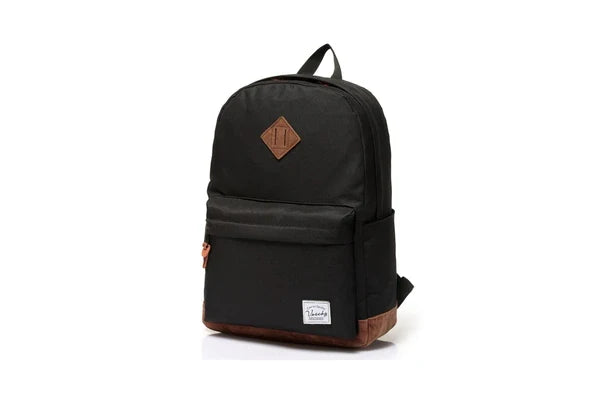
The Vaschy ClassicPack Reinforced Suede-Bottom Laptop Daypack is one option to examine if you want a backpack with a padded laptop pocket. Its current listing also describes a double-zip main compartment, an exterior zipped pocket, bottle pockets on both sides and adjustable padded shoulder straps.
Those features give you a layout to evaluate. You might plan to keep a charger pouch away from the laptop pocket and use the main compartment for class materials. Whether your own pouch, books and computer work together still needs the measurement and access checks above.
If you are buying mainly to carry a laptop, confirm the fit first: the current page's screen-size descriptions are not consistent, and its sleeve measurements do not provide a complete, clearly oriented three-dimensional limit. We cannot use those entries to promise that your particular laptop, shell or removable sleeve will fit.
Open the product page to review the available colors and photographs, then ask about your exact carried setup if laptop compatibility determines the purchase. The official product images in this guide show the bag's appearance; they are not a fit test or a statement of impact protection.
Confirm your device measurements before ordering if the laptop pocket is essential to your day.
View the ClassicPack and choose your color

Let the failure point guide your next step
Find the point where the fit breaks down before replacing the bag or sleeve.
- The computer does not fit its removable sleeve: revisit that sleeve's internal dimensions and the space taken by the hard shell. The backpack is not yet the relevant comparison.
- The filled sleeve will not pass through the backpack opening: ask about a wider usable entry or compare a different compartment design. More overall bag volume does not resolve a narrow entry by itself.
- The setup enters but the closure strains: stop trying to force it. Recheck thickness, corners and any filled accessory pocket, then consider another arrangement or bag.
- The fit works until books are added: repeat the check after moving only the items you can realistically relocate. If normal daily access still requires unloading the bag, consider a different layout.
Keep your intended case or sleeve in the comparison. If you remove it to get the laptop into a bag, you have changed the setup you planned to carry.
If you are evaluating a new bag, read the current Vaschy return policy before removing packaging or taking it outside. The policy includes condition requirements and other limits; an at-home fit check is not a promise that a used bag will qualify for return.
Quick answers before you order
Can two laptops with the same screen size need different bags?
Yes. Screen diagonal does not specify the enclosure's width, depth or thickness. Compare the exact device models and any cases, then check those measurements against the usable compartment and entry opening.
Should I measure the laptop or its padded sleeve?
Measure whichever item will enter the backpack pocket. If you keep the laptop inside a separate padded sleeve, measure that sleeve with the computer and any usual pocket contents inside. Check the laptop-to-sleeve fit separately.
Does a padded pocket replace a separate protective sleeve?
That depends on the protection you need and the documented design of each item. A padded pocket alone does not establish a drop rating or equivalent protection. If you intend to keep a separate sleeve, include it in the fit check instead of assuming you can leave it behind.
What if the listing gives only a screen-size limit?
Ask for usable internal dimensions and the opening measurements, giving your exact laptop model and cased measurements. Without enough information, compatibility remains unconfirmed even when the screen-size wording looks suitable.
Choose with your measurements in hand
Save the three measurements and exact model name in a phone note. You can use the same note while shopping or asking support to confirm a fit.
Review the ClassicPack layout and color options, or compare other Vaschy backpack designs. Confirm the laptop-pocket fit, then choose the bag that also lets you take the computer out and put it away during a normal day.


