
How to Pack for an In-Person Art Portfolio Review
Choose a bag around how you will present your work. This guide covers a printed set, a digital review, and oversized work that needs a separate carrier.
Pack for an art portfolio review around the way you’ll show your work. A short stack of prints needs a flat carrier you can open without disturbing the order. A tablet needs an offline set and a place you can reach before you sit down. Large or fragile originals may call for their own portfolio case. Choose which version of the work you’ll show first. That decision determines whether your everyday bag needs to hold a flat sleeve, a cased tablet or just the supplies that travel beside a separate portfolio.
Find out what your reviewers can see on the day
Start with the host’s current instructions. Ask whether reviewers can see original work, a physical portfolio, digital images on your device or a combination. Check if the host asks you to register and whether individual programs have their own directions. The National Portfolio Day Association FAQ explains the association’s review events. A one-on-one appointment or review for a particular application can operate differently.
Tufts Admissions’ Portfolio Day advice covers originals, sketchbooks and digital documentation, with a reminder to download what you want to show. MassArt’s preparation guide gives another school’s perspective. Use their advice to decide what belongs in the review. Then plan the carry around the route, the surface you’ll have and the time it takes to put everything away before the next conversation.
Build a physical set you can put away in order
Place the pieces on a clean surface in the order you want to show them. Decide what you’ll put on the table first and which items are useful only if the reviewer asks. If you have a small study or sketchbook page that explains how a larger piece developed, keep it next to the corresponding image in the set. A thin divider between the main set and the backup pieces can help you tell which is which by touch.
Measure the outside of the container that will hold the work. For a portfolio sleeve, include the seam, closure and stiff corners. For a ring binder, include the spine and any tabs. Test it in the opening of the bag while the pouch, keys and charger are in their normal places. Give pens their own case and keep bottles and food from pressing against a clean paper surface.
Try a repacking routine with two piles. Finished with a piece? Put it behind the last piece in a designated stack, or slide it straight back into its marked sleeve. Before you leave the table, count the sleeves or scan the tabs. One missing page is much easier to find when you know which reviewer just saw it. When a reviewer asks to return to a piece, you should be able to find it without unfolding the whole portfolio again.
Test a digital presentation from inside the bag
Save the set to the device you’ll actually carry and try opening it without an internet connection. Start from a locked screen, as you would after waiting in line. Check that the first images are quick to reach, that their order makes sense and that any video you intend to show plays locally. Make a second copy somewhere appropriate for your work so a device problem doesn’t erase your only version.
Pack the tablet in the case you’ll use on the day. The case can add enough width to change how it comes through an opening. Put the charging cable where you can find it without pulling the device out of its case. If you’ll use a stand or folding cover, test the amount of table space the setup takes. Keep a notebook or card for notes where it stays accessible after the tablet is stowed again.
A hybrid review works well when the two formats have different jobs. Show a coherent sequence on your device and bring one or two physical pieces if surface, scale or texture matters to the conversation. Put the primary format where you reach it first. If the sample needs a separate carrier, make sure you can open it without draping the everyday bag over the art.
Carry oversized work on its own terms
For large pieces, ask the organizer about acceptable formats and space before you plan to bring them. If the host accepts a digital image of work that would be difficult to move, you can lighten the walk without changing the main conversation. If the physical piece is important, fit the separate carrier around the work and use your daily bag for everything else. A carry sleeve or case is a different purchase from an everyday messenger or tote.
Rehearse with both bags if you’ll use two. Open a door, take a few steps and sit with your bags at your side. See whether one hand can keep the artwork upright while you reach the other bag. If you need to lower the portfolio every time you reach for a transit card, move the card to a pocket you can use more easily before you leave.
Make a two-minute practice table
Set a timer and clear only the width of a placemat on a table. Start with the entire kit packed. Sit, show the first two pieces to a friend or an empty chair, take one note and put everything away. Check which hand has to hold the bag and whether you can reach the note without laying the bag on top of the work. If you need a second surface, change the order of the contents and try it again.
On the second run, add two pieces of scrap paper as stand-ins for brochures. Stow them separately while keeping the portfolio in order. That short experiment can tell you when a flat pocket or a standing tote saves time, and when the bag you already have will do exactly what you need.
Compare a canvas messenger and a quilted tote
For a print set in a dedicated sleeve
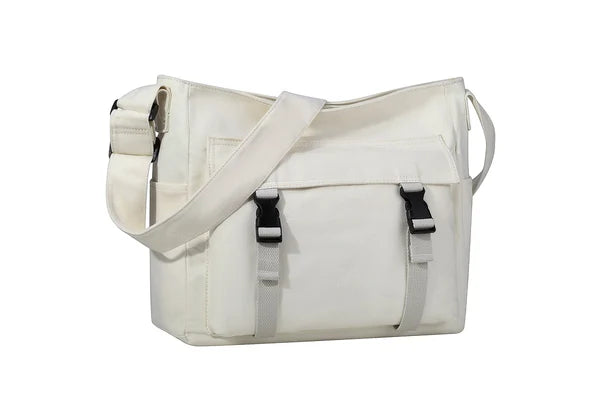
The VASCHY Large Canvas Messenger Bag is listed at 18 L and has a large front flap pocket with two buckles. The messenger carry gives you a place to organize personal items while you keep one hand on the portfolio. Try a small notebook or envelope in the front pocket and see whether the items you’ll need between reviews come out smoothly. Put a stiff paper sleeve through the main opening before you decide this bag fits it.
Practice standing in line with the loaded bag, then taking it off at the table. A messenger can sit within reach when you take notes, especially if you’re also managing a separate carrier. If its packed weight makes you keep shifting your shoulder or you find yourself fastening the buckles whenever you put a note away, reorganize the front pocket and try again.
Shop the Vaschy Large Canvas Messenger Bag in Beige if you prefer a crossbody carry for a print sleeve and review-day extras.

For a tablet-centered review and fast resets
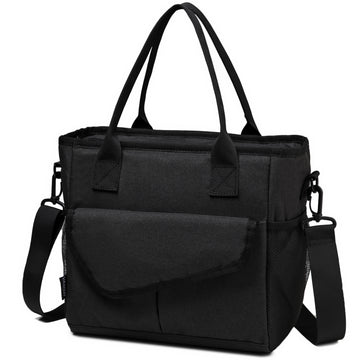
The VASCHY Quilted Puffy Laptop Totes listing gives an 18 L capacity and describes a quilted design. Try this format when the device in its own case is your main presentation kit and you expect to set the bag down beside you between conversations. Put your notes and charger in different places so you can take notes without dragging a cord across the table.
Verify the actual opening with the cased device. Then try the same load with an extra handout or a scarf in the tote. If a softer bag collapses around the device when you lift it out, see whether holding a handle steady makes the movement easier. Choose the layout that gets you to your first piece quickly in the position you expect to use it.
Shop the Vaschy Quilted Puffy Laptop Tote in Khaki if you carry a tablet and want an easy-to-set-down bag between reviews.


Reset your bag before joining the next line
Make a short note about the advice while you remember which piece it referred to. Include the reviewer or program name so you can distinguish one perspective from another later. Tuck brochures behind a divider or into a separate pouch so the handouts don’t become part of the next presentation. Check that the paper set is back in order, or return the digital presentation to its starting view before locking the device.
Questions before you leave for the review
Is a school backpack good enough?
Try it with the complete kit. If you can remove the work without bending corners and get to your notes without taking everything else out, it may be a good choice. Look at the route and the table setup before spending money on a new format.
Should I pack every sketchbook?
Choose examples with a clear job in the review. A small process selection may be easier to show and remember. Use the school’s instructions to decide how much work to bring and whether digital documentation is appropriate.
Do I need a bigger bag if I expect to collect brochures?
Usually you can plan around a spare pocket or thin folder for what comes home. If the artwork is the item causing the fit problem, solve that first with a suitable carrier or a digital presentation the host accepts.
Pick the bag you’ll want between tables
If your review revolves around printed work and a crossbody carry, shop the Vaschy Large Canvas Messenger Bag and test the stiffest piece you’ll put inside. If your work is primarily digital and you prefer a tote, shop the Vaschy Quilted Puffy Laptop Tote and compare its opening with your device in its actual case.


