How to Choose a Bag for a Laptop and Over-Ear Headphones
A rigid headphone case changes the way a laptop bag packs. Try the opening and extraction tests before deciding between a backpack and a quilted tote.
Bring your closed headphone case to the bag test. It needs to clear the opening and leave a straight path for the laptop. Start with a backpack if your walk calls for two free hands and the case needs its own depth. Try a quilted tote if you spend the day setting the bag beside a chair and reaching in from the top.
Trace the closed case before you measure a bag
Set the headphones in their case using the manufacturer’s instructions, then close it normally. Leave any cable or adapter stored in the place you actually use. Sony’s instructions for one folding model, for example, show how to arrange the headband and earcups before putting them away. Other models have their own directions. The shape to plan around is the shell you carry, with the lid shut and the zipper pull in its usual place.
Lay the case flat on scrap paper, trace the outside, and write the maximum thickness on the tracing. The thickest point might be off-center, where the cups sit. Mark the edge you usually grab so you remember which way the case must turn. When you’re shopping with the tracing, compare it with the mouth of the bag. Use a separate folded piece of cardboard to represent thickness if you can’t bring the case. A case that looks small on paper may still be too deep to rotate through the zipper.
For a wide, flat case, test whether its corners cross the opening without tilting the laptop forward. For a deep, folded case, see whether it drops straight down and has a place to sit without making the front bulge. Dimensions tell you where to begin. The real verdict comes from closing the packed bag as you normally would and checking whether the two objects still move independently.
Notice where the zipper narrows
Trace the route from outside the bag to the resting spot. An opening may be roomy at the center and tight at either end. A coated zipper, seam or flap can limit space even when the front of the bag looks wide enough. Try the case in both orientations. Stop and change the angle if the housing scrapes the zipper teeth or you have to pull the opening apart with both hands.
Make the laptop and the case pass two separate tests
Start with the laptop and the sleeve or protective cover you already use. Pack the rest of a busy day around it, including the charger, notebook and anything else that competes for room. Leave space in front of the laptop for the case. If you use a rigid lunch container, put it in its ordinary place before deciding where the case should go. An empty-bag trial can miss the spot where that container and the headphone shell meet.
Now leave the case in the bag and pull the laptop out in one motion. If the laptop corners catch on the case or the bag folds inward, move the case and try again. Reverse it by returning the laptop and taking out just the headphones. Note which action needs two hands. Taking a laptop out at a desk and fishing out headphones while standing at a station are different movements. Both should work with your regular clothes and without unloading the charger.
Set the bag on the floor or a chair while you make the swap, as you would at work. Observe what shifts when the bag goes from upright to resting on one side. Hard objects that stay put in a staged photo can roll against a computer when the bag tips. Give pens, keys and power adapters another spot. If a case settles against the middle of the laptop lid and you can feel the pressure from the outside, try a different orientation or a roomier bag.
Try a workday with two very different shapes
Suppose you carry a laptop in a slightly flexible sleeve, a packed lunch and a case that’s broad at one end. In the backpack, put the sleeve in its normal pocket and try the short end of the case down first. If the broad end still overlaps the laptop’s exit, turn it toward the front panel or move the lunch. If that leaves only a thin vertical slot beside the opening, a tote may give the shell a simpler route.
For the tote trial, start with the same pieces and turn the shell so you can grasp it without a reach across the laptop. Shoulder it, set it down, then remove just the computer. If the shell has slid under where the computer goes, the layout fails even if the first insertion worked. You can try a smaller soft item beside the shell to stop it shifting. Change just one thing at a time so you can identify the shape or pocket that made the carry easier.
Keep the corner where you actually reach
A small, flat cable pouch can tuck beside a notebook. A rigid power brick may be better away from the laptop and headphone case. Use the position that lets you take each piece out without tugging on the others. At your desk, give yourself one spot to set the headphone case while opening the laptop. If you always end up laying it on top of the keyboard, your chosen pocket may be harder to reach than it needs to be.
Compare a backpack and a quilted tote with the same load
Choose the backpack when the load is taller and you walk between stops
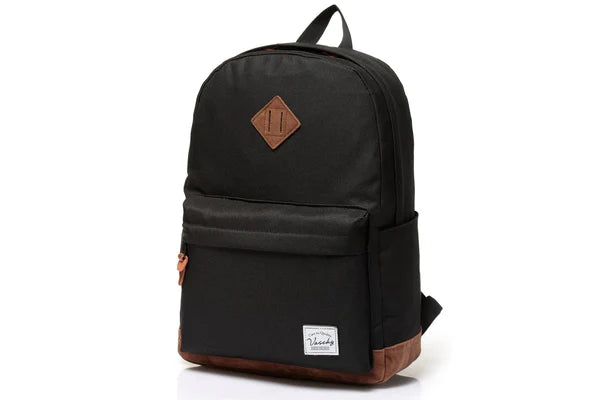
Vaschy lists the ClassicPack at 20.7 liters and describes a double-zip main opening, a padded laptop pocket and side bottle pockets. The shape is worth trying if a laptop and notebook travel vertically while the shell can sit separately in the main compartment. Start at the lower front, then adjust for anything you carry there. Placing a rigid case at the very bottom makes sense only if you rarely need the headphones in transit or can reach them without first lifting the laptop.
Shop the Vaschy ClassicPack in Black if a two-strap carry and separate laptop pocket suit your route. Test your own laptop, cover and case together. Vaschy’s listed laptop size references differ, so use actual measurements rather than the size in the product name. The front zipper pocket gives small items somewhere else to go, which can make your headphone shell easier to pull directly from the main compartment.

Try a tote if you want to see and lift the case as you sit down
The 18-liter Vaschy Quilted Puffy Laptop Tote gives you a shoulder-carry alternative. It can be appealing for a workday when you put the bag down next to your chair and reach over the top for the headphones. Load a flat case beside a folder or position a deeper shell so it does not sit across the laptop. Check how the bag hangs with the strap over the coat or sweater you wear most. If the shell comes across the opening at that angle, repeat the fit check while the bag is on your shoulder.
Shop the Vaschy Quilted Puffy Laptop Tote in Light Blue if top access and a visual check of your gear matter most. The quilting gives this style its look. Use the headphone maker’s own instructions or a suitable case for protection. Capacity alone gives no assurance that a specific computer or headphone shell can enter, close or stay accessible.


Rehearse a stop where you might open both cases
Pick one realistic moment that has caused trouble before. Maybe you have a few minutes before a video call, or you’re trying to put the headphones away before leaving class. Set the packed bag on a chair, take the headphones out, remove the computer and then reverse the sequence. Notice how many things end up on the seat. When the new bag works, one item can stay packed instead of holding up the whole routine.
Try the same sequence with the zipper pulled most of the way closed. A bag can behave differently when the only available space is near a chair leg or under a shared worktable. Leave the laptop in its pocket and reach for the case where it starts. Return the shell, then close the bag without lifting the weight by its zipper. If anyone shares the bag with you, let that person try the same task without explaining exactly how you packed it.
For a day when the headphones are optional, pack without them and see how the remaining items travel. You may prefer a slimmer profile when the shell spends most of the week on your desk. For days with both items, save the best layout with a quick photo of your own bag. It can be easier to repack after a meeting if you know which item goes down first.
What to check before ordering
Could I put my headphone case in the laptop sleeve?
Start by reserving the sleeve for the computer and checking the main compartment for the shell. Sharing the same pocket can put two rigid objects against each other and make one block the other. If the case and laptop have a divided area in the bag you are considering, repeat the extraction test with each section filled and with the strap tension you usually use.
Is it worth buying a bigger bag for occasional headphone days?
Try rearranging your usual load first. A narrow opening stays narrow in a larger bag of the same shape, and unused capacity can give a round case room to tumble. If the problem is that the case cannot turn or the computer cannot exit, choose for that particular movement. Extra space earns its place when the battery, water bottle and notebook can still have the positions you need.
Pick the carry that handles the harder move
Write down which action fails first in your current bag. If taking the laptop out pushes the shell into the zipper, make laptop removal the first test in a store. If you mainly switch to headphones between calls, start with a seated reach. Then check the other action before making the final decision. Keep the container you trust for the headphones and choose a bag that works around it.
Shop the Vaschy ClassicPack if you want both straps and a separate computer pocket for a varied commute. Shop the Vaschy Quilted Puffy Laptop Tote if most of your day involves setting the bag beside you and taking out the case from the top.


