How to Choose a Bag for a Mechanical Keyboard and Laptop
Use the keyboard case you actually carry to compare a backpack and a messenger. Test the entrance, the turn and the order you unpack at a desk.
Set the closed keyboard case next to your laptop and bring both to the bag test. The case needs room to turn through the opening, then a resting position that leaves the computer easy to remove. Try a backpack for a vertical carry and a messenger for a horizontal setup. Include the wrist rest, mouse and cables you really use.
Start with the longest piece that will travel
Lay out the keyboard as you use it, with the cable detached when the design permits and the wrist rest beside it. Decide which pieces need their own cases. If your keyboard has a fixed connector or a permanently attached cable, account for where it goes in the closed case. Set any removable extras aside until the principal load fits. A mouse pad can change how you configure the rest of the bag even when you already know where the keyboard will sit.
CORSAIR’s guide to keyboard layouts explains how full-size, tenkeyless and smaller layouts differ in the groups of keys they include. That is useful shopping context. For choosing a bag, measure the finished package instead of guessing from a layout name. A bulky frame, a tall knob or a wide case can change the shape more than the name suggests. Case makers such as Wooting provide model-specific compatibility, so check the case instructions for your particular keyboard.
Measure the case with every closure shut normally. Note length, width and depth at their widest points, including a handle that does not fold away or a zipper end you cannot tuck down. If the case tapers, mark which end is wider so you can try both directions in a prospective bag. Keep a reading in inches or centimeters for the largest outer dimension and use the same unit when you compare bag measurements. A quick tracing is useful when you cannot bring the equipment with you.
Make a practice version with a visible corner
Draw the outside of your case on two pieces of cardboard. Hold them apart with a folded spacer that approximates the depth. Mark the corner you grab first and the end you’ll reach for when the bag is upright. The mock-up shows whether the opening closes around your hand before you can get a proper grip. You can use the mock-up at a store without putting your keyboard at risk or making it difficult to carry the rest of your day’s equipment.
Try the insertion turn before measuring the resting space
The longest edge often enters at an angle. Check that the corner can clear the mouth and that the second corner has room to swing down. A curved zipper, gusset, flap or raised internal seam can reduce space along that path. Try the route you expect to repeat on a typical day. If you have to unzip a bag fully, hold both sides apart and turn the case while the laptop leans out, see whether there is a bag with a straighter opening or a more independent exit for the computer.
For an upright carry, check how the case rests at its lower end. It should have a place to sit without hanging from the opening. If the top sticks out under the zipper, change the direction or use a different bag. For a horizontal carry, set the case down on its long edge and make sure you can still close the flap after you add the rest of the load. If a shorter case slips further down and crowds a hard charger, relocate the charger and try again.
Put the laptop in its actual sleeve or cover. With both items loaded, check that the keyboard case and hardware do not sit against the laptop lid. Give the wrist rest, mouse and power brick separate resting positions where possible. Notice how the objects shift when you lift the bag by its normal straps. Put the bag down in the position you expect to use at work. Something that stays put on the sales floor may slide toward the opening when the messenger hangs at your side.
Rehearse the two orders you will use at a desk
If you usually plug in the laptop first, try taking it out with the keyboard case still in its place. Watch whether the laptop corners collide with the case or whether you have to tip the bag. When you bring the keyboard out next, decide where that case will sit while the rest of the desk is in use. Try keeping other accessories packed until you need them. That gives you a better idea of whether the layout works in the time and space you actually have.
Now do a keyboard-first setup. Imagine a narrow hot desk, with the laptop already on a stand or a shared dock waiting. Keep one hand on the bag and use the other to lift the case as you would when standing. See whether you can pull the keyboard out without crowding the mouse, moving a second bag or resting the closed case directly on the computer. If one sequence works and the other routinely catches, choose the bag for the move you make more often.
Check one full-size load and a compact alternative
Suppose you already own a full-size keyboard with a separate wrist rest and sometimes borrow a more compact board. Mark each case outline on a different sheet of paper. Pack the same laptop, mouse and charger for both trials. If the larger case passes only when the computer is already outside the bag, think about the spot where you have to open it. At a quiet desk you can set both down. On a crowded commute you may prefer a setup where the case stays put until the laptop is out.
Put the smaller case in the space the full-size one occupied. Test whether it now pivots down and makes the charger harder to reach. Use a separate pouch or another position if it shifts. The goal is to see whether the shorter shape frees access or merely frees capacity. If both loads work in one format, try carrying each downstairs and setting it beside a chair to see which order stays practical.
Consider what changes on the way home
The cable may go back in a looser bundle. The wrist rest may be warmer or simply repacked in a different place. Put the case away first and try returning the rest of the contents while you are still seated. If you have to force the zipper, remove the objects and identify the edge that gets in the way. Do the same test once with a water bottle and a lunch kit if those are part of your normal bag. Keep the office tech test representative of how you commute.
Compare Vaschy formats with the same gear
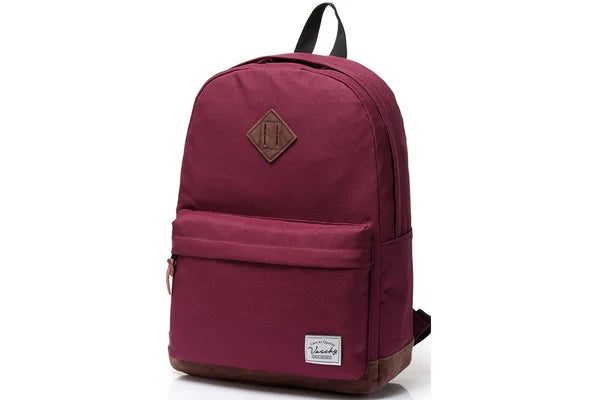
Try the ClassicPack for an upright stack and a two-strap walk
Vaschy lists the ClassicPack at 20.7 liters and describes a main compartment with a two-slider zipper and a separate padded laptop pocket. Compare it if you want to walk with both hands free and can settle the cased keyboard independently of the laptop. Use the case outline, because the measurements in a laptop bag’s name do not tell you whether a keyboard case will pass its mouth. The manufacturer’s laptop size references for this model differ, so confirm fit with your actual device, protective sleeve and case.
Shop the Vaschy ClassicPack in Burgundy for a backpack layout with a dedicated place to test your laptop and depth for the rest of the gear. Put your smallest cords in their own position after you know which direction the case needs to turn. If the upright case leans over the computer’s path, change its starting orientation and see whether you can close the bag without pressure.

Try the Large Canvas Messenger for a horizontal setup
Vaschy lists the Large Canvas Messenger Bag at 18 liters and describes a large front flap pocket with two buckles. Consider it for routes where you can set the bag on a counter and take the case out from its long edge. Test the same packed keyboard setup you used for the backpack. Bring the outer dimensions of the laptop sleeve as well. Keep room in the opening to get a hand around the case rather than relying on the length of the bottom panel.
Shop the Vaschy Large Canvas Messenger Bag in Denim Blue to try a shoulder carry with a covered front pocket and a different path for the keyboard case. A hard case that matches the interior length may still block the flap when you add a mouse case or wrist rest. Carry the messenger a short distance with your regular coat on to see whether you can keep the load steady as you move.


Check the two packing mistakes that change the size you need
Should I measure with the wrist rest on the keyboard?
Measure whichever arrangement you intend to carry. If it has its own sleeve, measure that too, then test where it fits when you reach for the keyboard. Depending on the shape, a wrist rest may be better alongside a thin folder than resting on the case. Avoid treating the bare keyboard’s measure as the only number that matters.
Would a shorter keyboard fix the problem?
A smaller layout can change the packaged shape. First try repacking two items you already own. If the opening is the only obstacle, a different bag may make more sense than changing how you type. If the case and all of your everyday gear simply exceed the space you want to carry, decide whether the keyboard needs to travel every day.
Buy for the unpacking order you actually use
Identify the move that is hardest with your current bag. Make it the first thing you test when comparing a replacement. Shop the Vaschy ClassicPack if two straps and a separate laptop pocket suit your commute, or shop the Vaschy Large Canvas Messenger Bag if the same cased gear can enter and leave more easily on its side. Try both exit orders with the real case before deciding.


