Backpack or Messenger Bag for College? Start With Your Commute
Compare a backpack and a messenger bag through the changes in a campus commute: carrying, stowing and reaching for class materials. Check two Vaschy layouts.
You wear your bag on the walk to campus, hold it close on a crowded bus and open it beside a lecture seat. Those changes can matter as much as how the bag feels on your shoulder.
For college, start by comparing backpacks if you want two-strap carrying and an upright layout for a varied daily kit. Consider a messenger bag if you prefer a shoulder or crossbody format and want its opening within reach when you pause. The better choice is the specific bag you can carry, stow and open comfortably throughout your usual trip.
A style label does not tell you how much fits, how quickly you can find a transit card or whether a laptop has the protection you need. Use the route below to compare real designs before ordering.
Sketch the trip from your door to your desk
Write down the parts of a normal commute where you handle the bag differently: walking to a stop, boarding a vehicle, sitting down, climbing campus stairs and taking materials out in class.
Beside each part, note what you need from the bag. You might need both hands available on the walk, a compact place for it while standing on transit and an easy way to retrieve a notebook at your desk. Your bag needs to work through each of those tasks.
Include the return journey. A library book, packed-up lunch container or layer of clothing may come home with you even if it was not part of the morning load. Avoid planning around the lightest possible day when that happens only occasionally.
Use your own journey as the comparison; there is no walking-time cut-off in this guide. A student who drives to a nearby lecture room has a different handling problem from someone who changes buses and walks between several buildings.
Walking: check how the bag rides while you move
A backpack's two shoulder straps give you a way to carry it on your back. A messenger bag generally uses one adjustable strap, worn over a shoulder or across the body according to the design. Neither description establishes a comfortable fit for every person or every load.
If you can try a bag, adjust it with your ordinary contents inside and walk around a clean indoor space. Notice whether you keep grabbing a strap, repositioning the bag or using a hand to stop it moving. If you keep holding the bag in place, try a different adjustment or compare another design.
Check the clothes you usually wear, too. A coat changes the way a shoulder strap sits, and an empty-bag try-on may not tell you how the loaded arrangement feels. These are suggested checks for you to try; we have not conducted a comfort test of the products below.
Boarding: decide where the bag goes off your shoulder
Compare the bag in its stowed position as well as its worn position. A backpack may need to come off your back on a crowded vehicle. A messenger bag also needs a place where its body and strap do not get in other passengers' way.
For example, the Toronto Transit Commission's current courtesy guidance asks riders on crowded vehicles to remove backpacks and hold them beside themselves or place them between their feet. It also asks people carrying other bags to keep aisles clear and keep seats available for passengers.
In the United States, Sound Transit's rules describe holding personal items or using available storage such as under-seat space. These are local examples. Check your own transit agency's guidance rather than treating either as a rule for every campus commute.
At home, sit on a chair with the packed bag held close to you. Try the change from carrying it to placing it in the position you expect to use. Notice where the long strap, handles and closures end up. Can you keep control of the bag while leaving room for someone beside you?
This check is more useful than assuming a messenger is always easier on transit or that a backpack automatically fits beneath every seat. Both depend on the actual bag, its contents and the space available.

Access: rehearse the items you reach for mid-trip
Separate quick-access items from class materials. Your transit card, phone or keys may need to come out before the notebook or computer does. Decide which pocket you would use for each, then look at the steps required to reach it.
A messenger's opening may be easy to bring in front of you when you stop, but a flap and a zip can mean more than one closure to open. A backpack with a reachable front pocket may be convenient for small items even when its main compartment is not the pocket you want to use.
Try a simple sequence with the bag resting in its expected position:
- Find the item without removing unrelated belongings.
- Put it back where you can find it next time.
- Close the relevant pocket or compartment.
- Return the bag to its carrying or stowed position.
Do this while stopped, with the bag supported. Finish checking the arrangement before you walk or board.
If you have to move a lunch container to reach your phone, change the pocket plan before concluding that the whole format is wrong. If the available pockets still do not support the routine you need, compare another layout. Choose a pocket you can use in the position where the bag will actually rest.
Class: check the switch from carrying to studying
Set the bag beside a chair and take out the materials needed for one class. Then put them away again, allowing yourself the space you would have in a lecture room.
An upright backpack and a wider messenger can give you different ways to arrange notebooks and pouches. Neither shape guarantees that papers stay flat or that the item you need will be at the top. Think about the opening and where the bag rests while you work.
If a laptop is part of the kit, confirm the actual computer and case fit the intended compartment. Also check what protection the listing documents. A file divider separates items; its presence alone does not establish that there is a dedicated padded laptop sleeve or a tested impact rating.
Keep that device check separate from choosing the carrying style. A bag can handle the transition from bus to desk well and still be unsuitable for your computer setup. You do not need to force a device into a compartment to make a preferred style work.
Compare two Vaschy layouts
The following models illustrate two different formats. Their listed features help you decide what to inspect; they do not establish compatibility with every student, textbook or laptop.

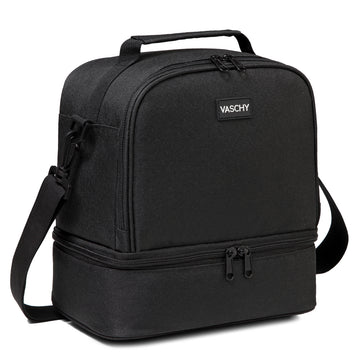
UltraLight Backpack: a main compartment with separate small-item access
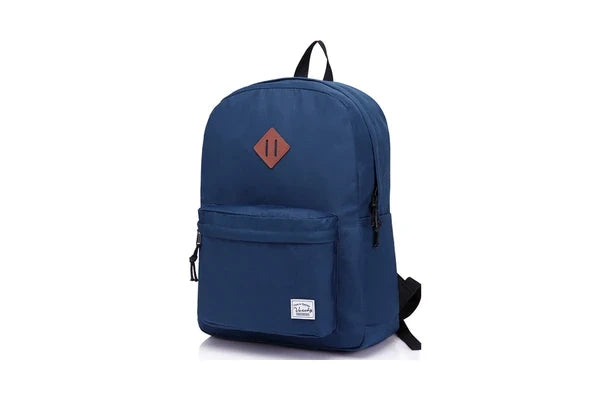
The Vaschy UltraLight Backpack lists a zipped main compartment with a file divider, a front exterior zip pocket, two side bottle pockets and padded back and shoulder straps. Its listed capacity is 20 L.
For the commute checks above, that gives you a main area for class materials and a separate front pocket to evaluate for small items. Check your own bottle in the side pocket and repeat the carry-to-seat transition with the bag loaded.
The listing describes a file divider. Do not assume that it supplies the dedicated laptop protection you require. If you keep your computer in a separate sleeve, include that sleeve when checking the arrangement.

Leather Style Messenger: check the flap and closure routine
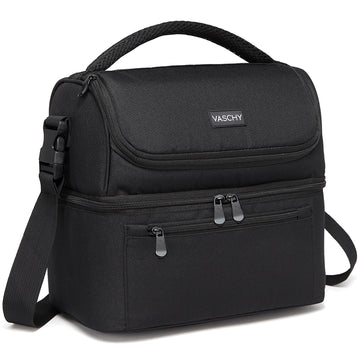
The current Vaschy Leather Style Messenger Bag For Men lists an adjustable shoulder strap, a top flap with magnetic clasps and a zipper. Its listed capacity is 14.4 L.
Look at how those closures work together for the items you retrieve most often. If you like a messenger format, check that opening, taking something out and closing the bag again feels manageable in the position where you expect to hold or rest it.
The 14.4 L listing is not a promise that your laptop or complete class kit fits. Verify those items separately, and check the current page for the color you want. The official photographs show this product's appearance, without demonstrating a commute or device-fit result.
Shop the Leather Style Messenger
Choose for the week you usually have
When the checks point in different directions, use the task you repeat most often and the transition that gives you the most trouble. Focus this purchase on the trips you make most often.
- You walk between several locations with a varied kit. Start by trying a backpack layout. Pay attention to worn fit and whether the front or side pockets support the items you use along the way.
- You travel with a compact kit and prefer access at your side or in front. Compare a messenger layout. Check its closure sequence and where it will sit when you are on transit or at a desk.
- Your journey mixes walking, standing and seated travel. Give extra attention to taking the bag off, holding it close and putting it back on. The easier worn format may not be the easier stowed format.
These are starting points for comparison, not verdicts about all backpacks or messenger bags. Repeating an awkward step several times a day may matter more to you than a feature you rarely use.
You do not automatically need to buy both styles. If one bag handles your ordinary kit and transitions well, start there. Compare a second format later if a recurring need remains, rather than buying it just to cover an imagined exception.
Before you order, check the limits of the comparison
Use the exact current product page for the model and color you want. A photograph, a liter figure or the name of a bag category cannot verify every fit or protection claim.
If you cycle to campus, look for documented features appropriate to that use and assess the actual setup. The words backpack and messenger do not, by themselves, establish how securely a particular bag will stay in position. This guide's suggested checks focus on walking, stowing and access.
Before trying a new purchase, read the current Vaschy return policy. Its condition requirements, exclusions and charges matter. Keep any initial inspection consistent with those conditions; a suggested indoor check is not a free outdoor trial or a guarantee of return eligibility.
Common campus bag questions
Is a messenger bag always quicker to open?
No. Check the actual pocket and closure sequence. A messenger with a flap and zipper can require multiple steps; a backpack's front zip pocket may be convenient for a small item. Compare the task you perform most often.
Does a larger capacity mean a better college bag?
Capacity tells you a listed volume, not whether a specific item fits through the opening or whether the packed bag works in a lecture seat. Choose enough usable space for your normal kit and check the arrangement you intend to use.
Should a transit commuter avoid backpacks?
A backpack can be part of a transit routine, but plan for taking it off and keeping it close on crowded vehicles where local guidance calls for that. Compare both the worn and stowed positions, and keep passenger space clear.
Make the next comparison with your commute in mind
Keep a short note of the three handling moments: carrying the bag, stowing it and taking out class materials. Add the pocket or closure that needs to work at each point. Use that note while comparing the next product page.
Shop the Vaschy UltraLight Backpack
Shop the Vaschy Leather Style Messenger
For other layouts, browse Vaschy backpacks or explore Vaschy messenger bags, then choose the model that works through the transitions you repeat during the week.


