What to Bring to a Campus Makerspace: A First-Visit Checklist
Prepare for your first campus makerspace visit with a plan for check-in, project files, approved materials and carrying your work home.
For a first campus makerspace visit, bring the check-in information the space requests and a short description of what you want to make. If you plan to use a particular machine, confirm the training, reservation, file format and materials before adding anything to your bag. Ask how you will collect or carry the project afterward, even if your first visit is just an orientation.
Keep your regular class items together. Then look at what has to travel for the project itself. A file may go to a staff member before you arrive, a sheet of material may need approval, and a finished piece may come home on a different day. Work out what has to move before deciding what to carry.
Choose what you want to leave with
Open your booking and look for the result: a tour, advice on a design, training or time on a particular machine. A tour and a machine appointment can happen in the same room and still call for different bags.
The University of Calgary Library makerspace guide distinguishes a visit to see the space from access to use it. It also lists self-service and staff-run options for 3D printing. The UC Santa Barbara Library makerspace FAQ describes different arrangements for drop-ins and reservations for a specific machine. Those are local examples. Find out what your own booking includes rather than applying one campus's policy to another.
Keep the location, appointment name and requested ID accessible before you get to the desk. If your facility asks you to complete something online, check whether it must be done before you arrive. The Scripps Sandbox first-visit guide asks eligible new visitors to bring their school ID and a device for an online form; that is a requirement for its own process, not a reason to bring a laptop to every orientation.
Make a note someone can use at the desk
Start with what the piece should do rather than the name of a machine. Write down what it should hold, attach to or replace, plus any size you already know. Add a sketch if words alone are awkward. Bring that note in a form you can show quickly, without relying on access to a private course folder.
Suppose your club wants a holder for a display label. A sketch and the label’s dimensions give you something concrete to discuss. If you are booked for fabrication, staff may need different information. A sketch that explains the idea is not automatically the file the equipment accepts. Keep those two jobs separate when you ask what to prepare.
If the appointment is only a tour, you can leave project supplies behind unless the invitation asks for them. The UBC Mechanical Engineering student makerspace page, for example, lists a specific orientation and eligibility requirements. Treat orientation as the session it is, then note what remains to do before a later project visit.

Confirm how your file gets from you to the space
The Syracuse University MakerSpace getting-started guide directs visitors to the requirements for their chosen equipment, including what kind of file to bring. Check two things in your own facility’s instructions: the file it wants and how to get it there.
- Keep the editable original. You may need it if staff suggest a change. Name the version you intend to discuss so you can identify it among older exports.
- Prepare the requested copy. If the space specifies a format or unit convention, follow that instruction for your actual job. Do not assume the export that worked for a different machine will be accepted here.
- Check the handoff. Ask whether you should submit the file ahead of time, open it on a shop computer or bring it by another approved route. If you send a test copy, check that the space can open it through its approved route, not just that the file opens on your phone.
Use the handoff to decide whether a device belongs in the bag. For a discussion you may only need the note and sketch. If you are expected to edit at the visit, confirm what software or equipment the space provides and what you need to supply. Leave unrequested storage devices at home if the facility gives you another transfer method.
Ask about the exact material before carrying it
Before you carry a sheet across campus, ask what the shop supplies, whether it accepts outside material and how it checks what you bring. The UCSB FAQ describes limited supplies and options to bring additional material. That does not establish that your local space accepts a particular sheet, roll or scrap. Check the equipment-specific directions before buying anything.
Add the answer to your note. If you cannot identify a scrap from home, leave it there until you know what the shop needs to see. For an orientation, do not assume you need a starter set. If the facility requires particular clothing or protective equipment, follow its directions for the actual session. A packing list does not replace training or staff instructions.

Plan for the piece that leaves the room
Think about what you will have in your hands when you leave. Syracuse’s guide describes later pickup as an option for 3D prints, separate from work done during the visit. UCSB, meanwhile, distinguishes storage inside its makerspace from lockers outside it. Before leaving an unfinished project or material behind, confirm whether storage is permitted and how you will identify and retrieve it. A place for your backpack while you work is a separate arrangement from project storage between visits.
Ask when the piece is available and what condition it will be in at handoff. If you need a separate box or carrier, work that out for the actual shape and any handling instructions the facility gives you. Keep your usual school belongings in their own bag if that makes the return trip easier. There is no need to size a backpack around an object you have not yet designed.
Make one note as you leave: the next action, who is responsible and what you must take or collect. That can be as simple as revising a file, asking whether an item may be stored or checking the pickup process. If nothing is ready to go home yet, make sure you still have the things you brought.
Choose a backpack for the personal part of the visit
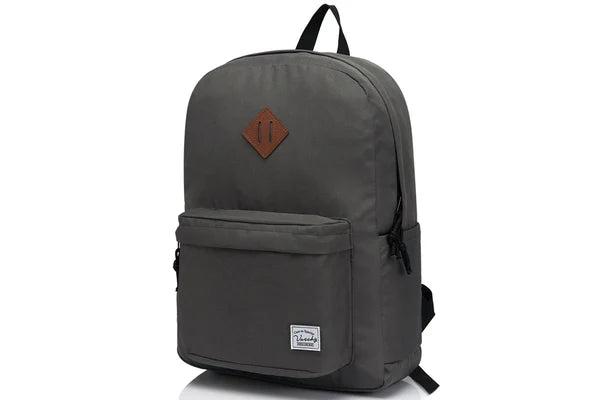
The VASCHY UltraLight Backpack in Dark Gray, SKU 16IS, is an ordinary campus carrier to compare. The listing describes a zippered main compartment with a file divider and an exterior zip pocket. You could use those areas for your own project notes and small class-day items. Check the complete paper folder or device in its actual case against the usable opening if you plan to carry it.
Ask where personal bags go during the visit. Keep the actual storage rule in mind while you compare what you carry before and after the session. The official photos show current colors and the bag's exterior. They are not a test of fit for a laptop, material sheet or finished part.
Shop the Dark Gray UltraLight Backpack or view Dark Blue, SKU 16SL. If the visit falls between classes, the Vaschy school backpack packing checklist can help you account for the rest of the day without treating coursework as part of the fabrication kit.

Run the first-visit check before you head out
- Do I know what this visit is for and what the space expects at check-in?
- Do I have a short project note and, if requested, the right file and a way to hand it over?
- Has the space confirmed who supplies the material and what I may bring?
- Do I know where my personal bag goes and what I must take home or pick up later?
Pack for the visit you have arranged. If you are missing an answer about equipment or material, ask the space before treating it as something to carry. If your ordinary school bag already fits the permitted personal kit, use it.
If you need a bag for those personal items, shop the UltraLight Backpack in Almond Beige, SKU 16XS, or view Camo Black Fusion, SKU 16MCPH. Check the selected variant with your usual load and the space's bag directions before ordering.


